Is that photo real? I ask that a lot more now. After a deepfake Elon Musk took a hundred dollars off me, I look at pictures differently. That story is here: I Sent $100 to a Fake Elon Musk Giveaway.
I’m 68. I grew up believing a photograph was proof. That isn’t true anymore. AI tools can now make a picture of almost anything, and some of those pictures are very good. I’m not an expert at spotting them. But I’ve picked up a few habits, and they take less than a minute.
You’ve probably already seen a fake
Remember Pope Francis in a big white puffer coat? Millions of people shared it in 2023, and a lot of them believed it. It was made with an AI image tool. CBS News covered how it spread.
That same spring, fake photos of Donald Trump being arrested went around. The BBC walked through how to spot them. A few months later, a fake photo of smoke near the Pentagon spread online. NPR reported that it was likely made with AI.
None of those people were careless. The pictures were simply convincing.
Five signs a photo may be fake
None of these proves anything on its own. But if you spot two or three, slow down.
- Hands and fingers. Count them. AI pictures often have extra fingers, fingers that bend wrong, or hands that blur into whatever they’re holding.
- Warped text or signs. Look at street signs, shirts, and storefronts. If the letters look like a word but don’t spell anything, that’s a warning.
- Skin that’s too smooth. Real faces have pores, lines, and little flaws. A face that looks like polished plastic is the same thing I saw on the fake Elon.
- Odd shadows. Shadows should all fall the same way, away from the light. If one person’s shadow goes left and another’s goes right, something’s off.
- Backgrounds that melt together. Look past the main subject. Fences, railings, crowds, and trees sometimes run together or turn into smudges.
A free 30-second check on your iPhone
This is my favorite habit. A reverse image search shows you where else a picture has appeared online. If a “breaking news” photo shows up on fact-check sites, or turns out to be years old, you’ll know fast.
Here’s how I do it with Google Lens. Google Lens is a free tool that searches using a picture instead of words.
- Save the photo to your phone, or take a screenshot of it.
- Open the free Google app. You can download it from the App Store if you don’t have it.
- Tap the camera icon in the search bar. That’s Google Lens.
- Pick the photo from your pictures.
- Look at the results. Check where it came from, when it first appeared, and whether any news or fact-check sites are talking about it.
If the only places it appears are random social media accounts, be careful. If a real news outlet calls it fake, you have your answer.
Ask AI for a second opinion
I also ask an AI tool. I use Grok or Copilot. Upload the picture and paste this:
Look at this photo. Point out anything that suggests it might be AI-generated or edited, like hands, text, shadows, skin, or background. Then tell me what you can't be sure about. Don't tell me it's real unless you have a good reason.Be honest with yourself about the answer. AI can be wrong here too. It might miss a good fake or flag a real photo. It can even change its mind the wrong way. That happened when a helicopter flew over my house, and Grok’s first guess turned out to be the better one: A Helicopter Flew Over, and I Asked Grok What It Was.
Treat it as one more opinion, not the final word. The reverse image search and your own eyes count too.
My own test: a video fooled me first
It happened with a video, not a photo. A clip came across my X feed, and it already had almost 300,000 views. In it, a coyote stares down two baby goats. A border collie jumps in between them, and then an orange cat walks up and stands right next to the dog. At the end, the cat reaches over and pets the dog on the head.
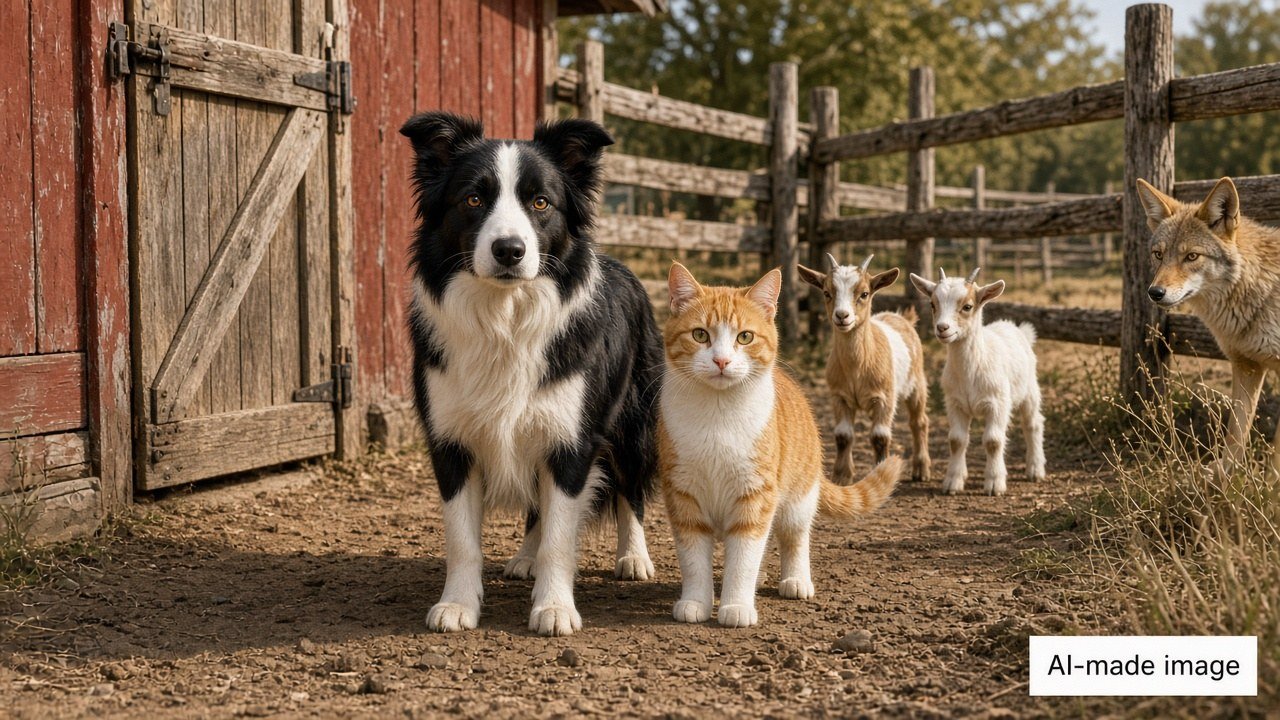
My first thought was, wow, the cat and the dog are working as a team. I honestly couldn’t tell if it was real.
Then I thought about it for a second. Duh. Who’s holding the camera? Somebody is calmly filming a coyote going after baby goats and never steps in? That made no sense.
So I asked AI to look at it closely. It was made by AI, and once I knew what to look for, the signs were easy to see:
- The cat doesn’t walk into the scene. It just appears.
- For a moment, the two goats blend into each other.
- The cat’s tail passes right through the dog’s body.
- The coyote freezes like a cardboard cutout while everything else keeps moving.
- At the end, the cat’s leg bends like rubber to pet the dog.
It was my own little glitch in the Matrix. In the movie, Neo sees the same black cat walk by twice, and that’s how he knows something isn’t real. My cat just showed up out of thin air.
You can watch it on X and see if you can spot them. The account says in its bio that it posts tech and science “in humor.”
For videos, I’ve added one question to my list: who is filming this, and does it make sense that they’re there? If the answer is “nobody would be standing there with a camera,” slow down.
Before you share: is that photo real?
Before I share a picture or a video that makes me angry, scared, or amazed, I give it 30 seconds. I look at the hands and the signs, ask who’s holding the camera, run one reverse search, and get one second opinion. That’s it.
The fake Elon got me because I was excited and in a hurry. Pictures work the same way. The ones that grab you hardest are the ones worth checking first.
More scam signs here: How to Spot Online Scams with AI.
Have you ever shared a photo and found out later it was fake? Tell me in the comments. I’ve been fooled too.
— Andrew
Want more plain-English AI help? Get my free 9-page starter guide.
The guide arrives in your welcome email right after you confirm.