The new Siri on an iPhone is the voice already in your pocket, with a longer conversation behind it. I am 68. My phone is an iPhone 17 Pro Max. I want to know what changed before I trust it with anything that matters.
This is not a new app you go hunt down on the web. It is the assistant built into the phone. AI, here, means the software that listens and answers in sentences. The new part is that it can keep talking, look at what is on your screen, and do a few things inside your apps. An app is a program you tap to open.
Why I updated
Apple released iOS 27 on September 14, 2026. iOS is the software that runs the iPhone. The new Siri comes with that update.
I updated from iOS 26.7 to iOS 27.
Apple calls the smarter Siri a beta, and it is in English first. A beta is a test version. It can change, and it can get things wrong. It runs on iPhone 15 Pro and newer. My phone qualifies. If yours is older than that, this version will not show up, and you do not need a new phone because of this post.
How to turn it on
On the iPhone, open Settings, then General, then Software Update. If iOS 27 is there, download it while the phone is plugged in and on Wi-Fi. Give it time. Do not start the update on your way out the door.
When it is done, you open the new Siri in one of two ways. Hold the side button. That is the button on the edge of the phone, the same one you already use to lock the screen. Or tap the new Siri app.
The first time, it may ask permission to use the microphone, and to see what is on the screen. Read those prompts. If you do not want it looking at the screen, say no. You can still ask it simple questions.
Three things worth trying with the new Siri on your iPhone
Start small. Three jobs. Not your whole life.
1. A reminder you can check.
Say this out loud:
Remind me tomorrow morning at nine to pick up a prescription. Say it back before you save it.
Then open the Reminders app and see if it is there. If it is wrong, delete it. A reminder is a safe first test because you can see it and undo it.
2. A letter, in plain English.
A bill, an insurance note, a contractor invoice. Cover the account number with your thumb or a piece of paper first. Do not show a Social Security number, a medical record, or anyone’s full name if you can help it.
Hold the letter so the phone can see it, or open a photo of it, and say:
Look at this letter. Explain it in plain English, like we are at the kitchen table. List any date and any dollar amount you see. Do not tell me what to decide. I will decide.
Read its list against the paper. If a date or a dollar amount does not match, trust the paper.
3. A simple recipe.
Say:
Give me a simple dinner recipe for two, using chicken and rice. Keep the steps short. Tell me how long it takes. Do not assume what else is in my kitchen unless I name it.
You still cook it. You still taste it. The phone does not know if the chicken is still good.
What I actually asked it
What I asked it, once the update finished:
I used my voice the whole time. I did not type. I asked what was happening this week. It opened my calendar, read it to me, and gave me a summary. I asked it to make a voice memo, and it said yes. Siri can open Microsoft Word, search for a document, and take dictation into it. It cannot do the harder editing and formatting. For that, use the tools inside Word. It could not make a contact file. When I asked what it can do, it told me about the Siri app. It did not show me how.
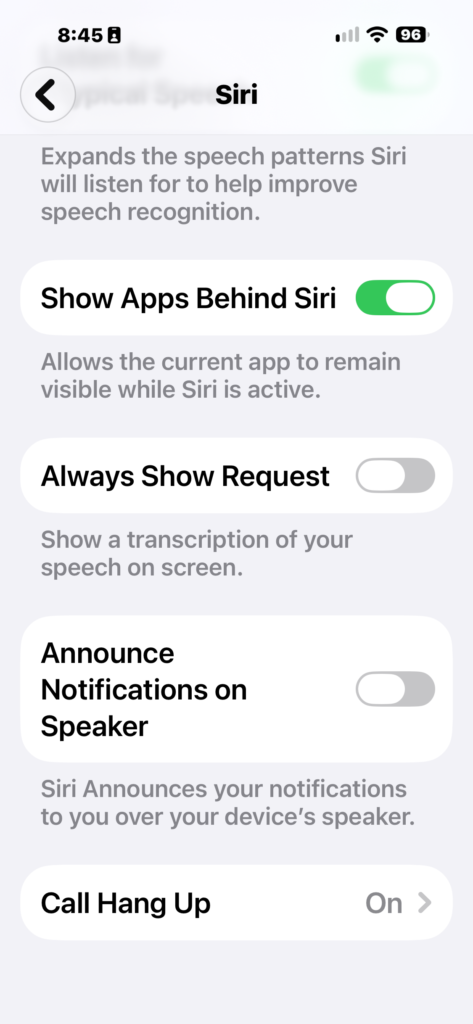
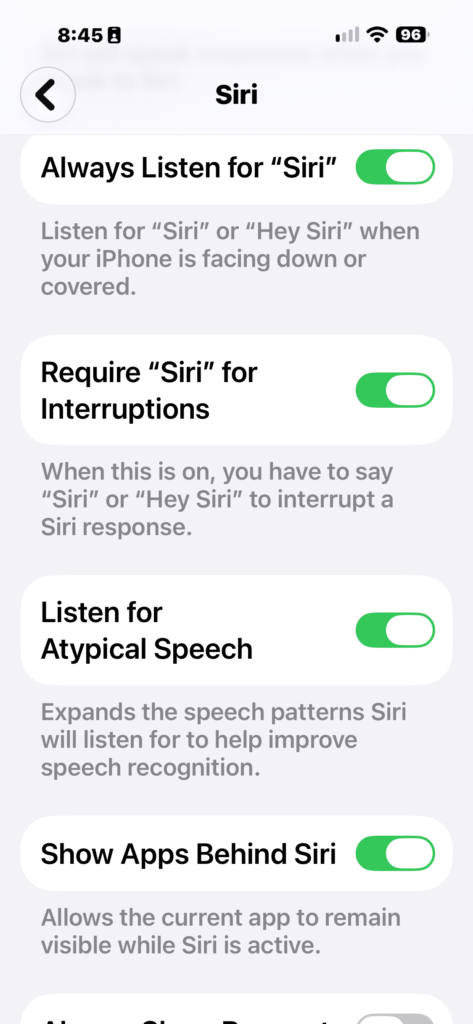
Sometimes I could not tell if it had heard me. So I changed it. Now it starts only when I say “Hey Siri,” not when I am just talking. I am used to that here, when I choose to talk instead of type. I am not used to it on the phone yet.
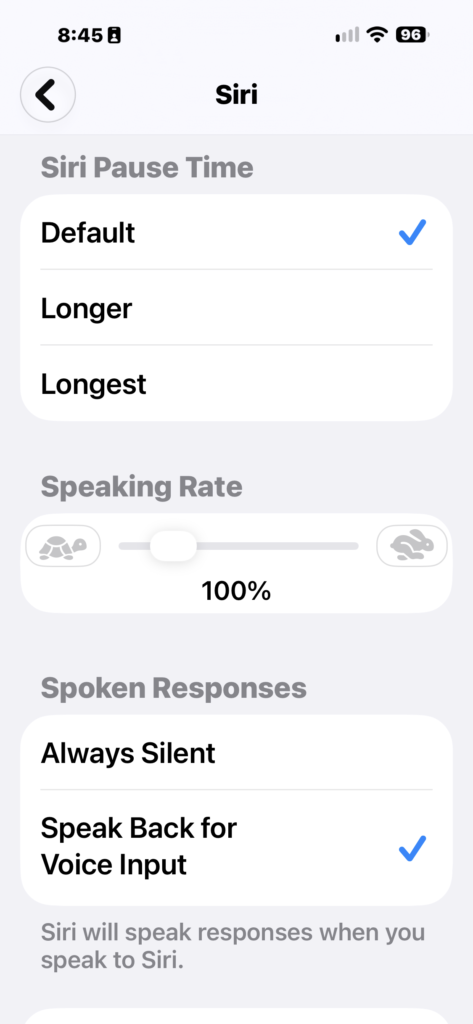
Always Show Request was off, so the phone did not show a transcription of what I said, and I turned on Require Siri for Interruptions so I have to say Siri or Hey Siri to cut in.
I do not want a crowd of helpers competing for me. I tried the one in the phone, and now it lives with me. I have to choose which one is on, and which one is listening.
It should be helpful at work and at home for the small jobs. Open the app, find the file, set the reminder, read the week. The harder editing still happens inside the app.
What it still gets wrong
It can sound sure and still be wrong. A smooth answer is not a fact.
It is not a doctor, a lawyer, or a financial advisor. Use it to turn stiff language into ordinary words. Then call the office, or a person you trust, before you act on a bill, a diagnosis, or money.
It can take actions in apps. An action means it might save the reminder, send a message, or change something, not just talk about it. Watch the screen. If you did not mean to send or pay, say stop.
Apple puts a daily limit on this beta. A limit here means a ceiling on how much you can use it in one day. When you hit it, you wait. Apple has also said heavier use may cost money later. I do not have a price, so I will not make one up. If a screen asks you to pay, stop and read it. Do not tap through.
The test version is in English first. If you wanted another language, it may not be there yet.
And it will not run your life in the background. You still confirm. You still decide.
One next step
Update to iOS 27 if your phone offers it. Ask for one reminder. Check that it landed. That is enough for one day.
If you try it, tell me in the comments what you asked and whether the reminder showed up. I read every one. I am still learning this with you.
— Andrew